
This past July 2020, I started my job at new job at a Dallas private Catholic school Digital Skills/ STEM teacher. Since taking the job, I have learned so much. For example, did you know Google has their own version of website creation? They’re called Google Sites!
Our school just adopted G Suite for Education Enterprise edition and middle school students received Chromebooks this year, instead of iPads (iPads moved down to 3rd-5th grade). Due to this happening, we wanted to make sure students had everything they needed to be successful whether they were learning synchronously online or whether they were in-person. I spent a couple weeks this summer creating a Google Site for students to learn step-by-step how to use different G Suite features.
Click to visit the site here.
I had heard about digital badging previously in April, and decided it would be a great time to start. Google Drawings has come in handy! Believe it or not, the Bitmoji Classroom creation skills I had developed while using Google Slides easily transferred over to Google Drawings.
Below are some example badges I have created with Google Drawings since.

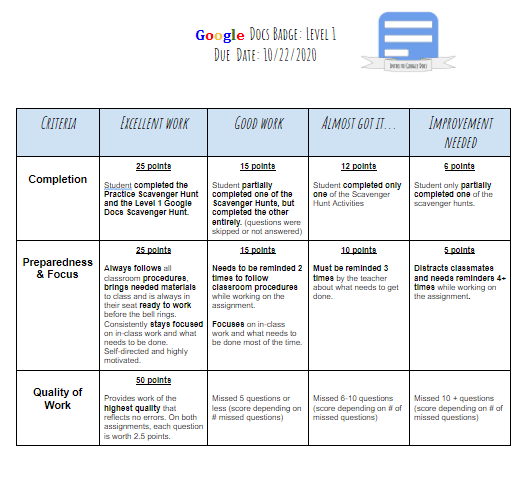
Want to get started with Digital Badging? I suggest creating rubrics and activities for each digital badge. Below is an example rubric!
I think creating the badges made the adventure of starting off the year using a new Learning Management System more fun!
Are you already using badges in your classroom? If so, I’d love to learn from you! Please comment your ideas!
 Education with Meaning